Pass Diff
Superseded — use IR Lower Trace
This tool has been superseded by IR Lower Trace (TL_LOWER_TRACE), documented
in IR Lower Trace. New users should use IR Lower Trace directly — it provides
phase context, codegen capture, multi-run accumulation, and an enhanced HTML
report. TILELANG_PASS_DIFF is retained only for backward compatibility.
Pass Diff shows how TileLang’s TIR changes as compiler passes run. It captures the IR before and after each pass, computes a unified diff, and writes the result to the terminal, an interactive HTML report, or both.
Use the environment-variable workflow to observe the complete lowering pipeline without modifying a program. Use the Python API when you want to apply and inspect a specific pass sequence.
Observe the Lowering Pipeline
Set TILELANG_PASS_DIFF before starting the Python process:
# Print colored diffs while passes run.
TILELANG_PASS_DIFF=terminal python my_script.py

# Write an HTML report.
TILELANG_PASS_DIFF=html python my_script.py

# Print terminal diffs and write an HTML report.
TILELANG_PASS_DIFF=both python my_script.py
TileLang reads this setting when tilelang is imported and installs a process-
wide hook around TVM pass execution. Setting the variable after importing
TileLang does not enable the hook for that process.
Variable |
Accepted values |
Default |
|---|---|---|
|
|
|
|
Directory for pipeline HTML reports |
|
False-like values (0, false, no, off, or an empty string) disable the
hook. An unrecognized nonempty value falls back to terminal output.
HTML reports use a timestamped filename such as
pass_diff_20260710_153000.html. The report is refreshed after each pass so a
partial result is available even during a long compilation, then finalized at
process exit.
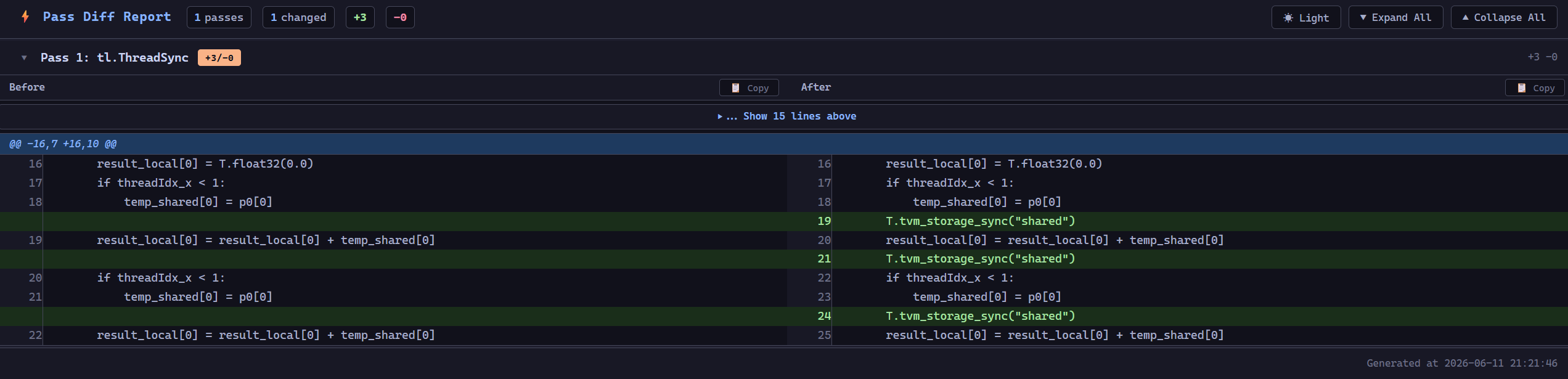
Pass Diff HTML report.
The HTML viewer provides side-by-side before and after source, collapsible pass sections, expandable unchanged context, copy controls, light and dark themes, and aggregate insertion and deletion counts.
Note
The pipeline hook wraps tvm.ir.transform.Pass.__call__ for the entire process,
so it observes TVM passes outside the immediate tilelang.compile() call as
well. Capturing IR and, in HTML mode, rewriting the report after every pass adds
debugging overhead. Leave the feature disabled for normal builds and benchmarks.
Compare Selected Passes
The pass_diff Python API accepts a PrimFunc or IRModule and applies the
provided passes in order:
import tilelang
from tilelang import tvm
from tilelang.utils.pass_diff import pass_diff

steps = pass_diff(
    func,
    [
        ("AnnotateDeviceRegions", tvm.tirx.transform.AnnotateDeviceRegions()),
        ("SplitHostDevice", tvm.tirx.transform.SplitHostDevice()),
        ("ThreadSync", tilelang.transform.ThreadSync("shared")),
    ],
    mode="both",
    context=5,
    html_path="tmp/selected_passes.html",
)
A single unnamed pass is also accepted:
steps = pass_diff(func, tilelang.transform.ThreadSync("shared"))
Parameter |
Description |
Default |
|---|---|---|
|
Starting |
Required |
|
One pass, a list of passes, or a list of |
Required |
|
|
|
|
Unchanged context lines included around each diff hunk |
|
|
Output file used by |
|
The return value contains one dictionary per pass with these fields:
Field |
Meaning |
|---|---|
|
Explicit step name, or a name derived from the pass type |
|
Complete TIR script before the pass |
|
Complete TIR script after the pass |
|
Unified diff as a list of strings |
|
Number of added lines |
|
Number of removed lines |
|
Whether the pass changed the rendered TIR |
For example, a test can assert that a transformation introduced an expected intrinsic:
steps = pass_diff(func, tilelang.transform.ThreadSync("shared"))
assert steps[0]["changed"]
assert "tvm_storage_sync" in steps[0]["after_script"]
Do not enable the process-wide TILELANG_PASS_DIFF hook when using the
programmatic API unless you intentionally want both layers of reporting. The
API invokes each pass normally, so the global hook would capture those same
invocations again.
Choosing an Output Mode
Use
terminalfor a small number of passes and immediate feedback.Use
htmlwhen a lowering pipeline produces many changes or you need to compare complete before and after scripts.Use
bothwhen iterating interactively but retaining a shareable report.Increase
contextonly for the programmatic API; the process-wide hook uses three context lines.
Pass Diff compares the textual form returned by IRModule.script(). A textual
change is useful evidence about a pass, but it does not by itself establish a
semantic or performance change.