Debugging Tile Language Programs
Overview
A Tile Language program (hereafter referred to as a program) is transformed into a hardware-executable file through several stages:
The user writes a Tile Language program.
The program undergoes multiple Passes for transformation and optimization (the lower stage, see
tilelang/engine/lower.py), finally producing an intermediate representation (e.g., LLVM or C for CPU, CUDA for NVIDIA GPUs, etc.).The generated code is compiled by the respective compiler (e.g., nvcc) into a hardware-executable file.
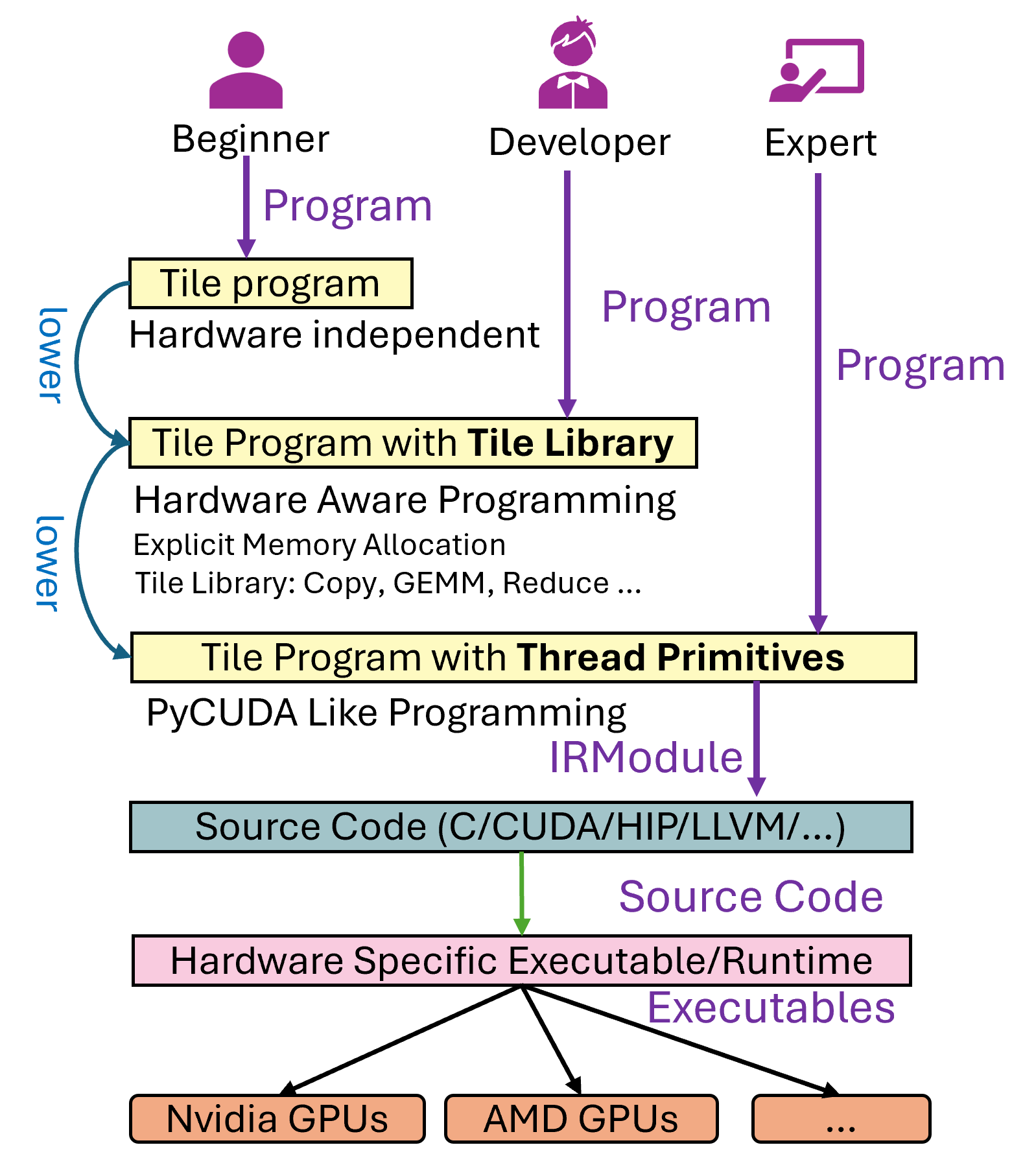
During this process, users may encounter roughly three categories of issues:
Generation issues: The Tile Language program fails to generate a valid hardware-executable file (i.e., errors during the lowering process).
Correctness issues: The resulting executable runs, but produces incorrect results.
Performance issues: The executable runs with performance significantly below the expected theoretical hardware limits.
This tutorial focuses on the first two issues—how to debug generation and correctness problems. Performance tuning often requires using vendor-provided profiling tools (e.g., Nsight Compute, rocProf, etc.) for further hardware-level analysis, which we will address in future materials.
Below, we take matrix multiplication (GEMM) as an example to demonstrate how to write and debug a Tile Language program.
Matrix Multiplication Example
In Tile Language, you can use the Tile Library to implement matrix multiplication. Here’s a complete example:
import tilelang
import tilelang.language as T

def matmul(M, N, K, block_M, block_N, block_K, dtype="float16", accum_dtype="float"):
    # ...existing code...

# 1. Define the kernel (matmul) with the desired dimensions
func = matmul(1024, 1024, 1024, 128, 128, 32)

# 2. Compile the kernel into a torch function
# ...existing code...
Debugging Generation Issues
TileLang essentially performs progressive lowering. For example, a T.copy may first be expanded into T.Parallel (see the pass LowerTileOP), which is then expanded again, eventually resulting in lower-level statements that can be translated to CUDA C code.
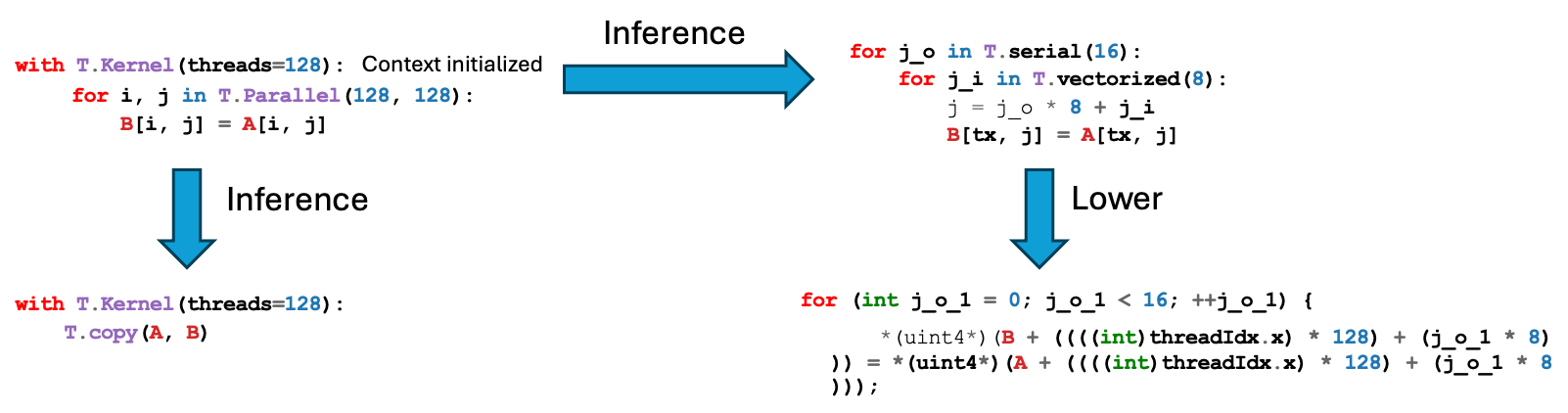
When the code fails to generate (for instance, a compilation error occurs), you do not necessarily need to jump directly into C++ passes to debug. Instead, you can first inspect the intermediate representations (IR) in Python by printing them.
For example, consider a case where a simple T.copy in 1D causes the lowering process to fail. The snippet below illustrates a simplified version of the problem (based on community Issue #35):
@T.prim_func
def main(Q: T.Tensor(shape_q, dtype)):
    # ...existing code...
The TileLang lower process might yield an error such as:
File "/root/TileLang/src/cuda/codegen/codegen_cuda.cc", line 1257
ValueError: Check failed: lanes <= 4 (8 vs. 4) : Ramp of more than 4 lanes is not allowed.
This indicates that somewhere during code generation, an unsupported vectorization pattern was introduced (a ramp of 8 lanes). Before diving into the underlying C++ code, it is helpful to print the IR right before code generation. For instance:
device_mod = tir.transform.Filter(is_device_call)(mod)
# ...existing code...
Debugging Correctness Issues
Sometimes, the kernel compiles and runs but produces incorrect results. In such cases, there are two main strategies to help debug:
Use post-processing callbacks to inspect or modify the generated CUDA code.
Use the built-in
T.printdebugging primitive to inspect values at runtime.
Post-Processing Callbacks for Generated Source
After code generation (in the codegen pass), TileLang calls a callback function (if registered) to allow post-processing of the generated source code. In src/cuda/codegen/rt_mod_cuda.cc:
std::string code = cg.Finish();
if (const auto *f = Registry::Get("tilelang_callback_cuda_postproc")) {
    code = (*f)(code, target).operator std::string();
}
Hence, by registering a Python function named tilelang_callback_cuda_postproc, you can intercept the final CUDA code string. For example:
import tilelang
import tilelang.language as T
from tilelang import tvm
from tilelang.engine.callback import register_cuda_postproc_callback


@register_cuda_postproc_callback
def tilelang_callback_cuda_postproc(code, _):
    print(code)  # print the final CUDA code
    code = "// modified by tilelang_callback_cuda_postproc\n" + code
    return code


kernel = tilelang.compile(matmul, target="cuda")
kernel_source = kernel.get_kernel_source()
print(kernel_source)
"""
// modified by tilelang_callback_cuda_postproc
#include "cuda_runtime.h"
...
"""
Runtime Debug Prints with T.print
TileLang provides a built-in debugging primitive called T.print for printing within kernels. Be mindful of concurrency and thread synchronization when using it in GPU code. Below are some examples showing how to print buffers, variables, and other data inside TileLang programs.
Printing an Entire Buffer
def debug_print_buffer(M=16, N=16):
    # ...existing code...
Conditional Printing
def debug_print_buffer_conditional(M=16, N=16):
    # ...existing code...
Printing Thread Indices or Scalar Values
def debug_print_value_conditional(M=16, N=16):
    # ...existing code...
Printing Fragment (Register File) Contents
def debug_print_register_files(M=16, N=16):
    # ...existing code...
Adding a Message Prefix
def debug_print_msg(M=16, N=16):
    # ...existing code...
The output messages will include something like:
msg='hello world' BlockIdx=(0, 0, 0), ThreadIdx=(0, 0, 0): 0
Visualize Inferred Layouts
Layout visualization prints the thread and local-index mappings inferred for
fragment buffers. It can also write PNG, PDF, or SVG diagrams, which is useful
when an incorrect result may come from an unexpected data mapping. Enable it
through the layout visualization pass configuration on the kernel being
debugged. The configuration keys, direct plot_layout API, supported output
formats, and limitations are documented in
Layout Visualization.
IR Lower Trace: Observing IR Changes Across Passes
IR Lower Trace captures the TIR before and after every compiler pass — plus the
final codegen step that produces C/CUDA/HIP source — and renders a terminal
and/or HTML diff report. Use it when the IR looks correct at one lowering stage
but is incorrect at a later stage. To trace the complete lowering pipeline
without changing the program, set TL_LOWER_TRACE before starting Python:
TL_LOWER_TRACE=terminal python my_script.py
TL_LOWER_TRACE=html python my_script.py
TL_LOWER_TRACE=both python my_script.py
For a focused comparison, apply a selected pass directly:
from tilelang.tools import lower_trace as lt

results = lt.lower_trace(func, tilelang.transform.ThreadSync("shared"))
The HTML viewer, output directory layout, codegen capture, edit-and-recompile workflow, and the full Python API are documented in IR Lower Trace.
Note
IR Lower Trace supersedes the older Pass Diff tool (TILELANG_PASS_DIFF),
which is retained only for backward compatibility. New users should use
TL_LOWER_TRACE directly. See Pass Diff for the legacy tool.
Pass Visualizer: Structure-Tree View Across Passes
The Pass Visualizer is a complement to Pass Diff. Where Pass Diff shows a line-level diff of the TVMScript text, the Pass Visualizer renders the IR as a structure tree (the SBlock nesting, with reads / writes / alloc_buffers / annotations fields) and expands every tile op by field name. A TVM PassInstrument observes the canonical CUDA lowering prologue, so the report follows the conditional passes and order that actually execute. It produces a single self-contained, interactive HTML file that steps through those passes. The CLI currently supports CUDA targets only; backend-specific pipeline dispatch can be added separately for other targets.
This view is most useful when debugging structural passes — layout inference, warp specialization, pipelining — where you care about how the IR’s block structure and operator semantics change, not just which text lines moved.
How It Differs From Pass Diff
Aspect |
Pass Diff |
Pass Visualizer |
|---|---|---|
Compared object |
TVMScript text lines |
|
Operator display |
Raw one-liner, positional args |
Expanded by field name ( |
Highlighting |
Generic |
Per-class: tile op / sync primitive / lowered hardware intrinsic |
Trigger |
Environment-variable hook, captures the real full pipeline |
Explicit CLI, instruments the real focused lowering prologue |
Quick Start (CLI)
Run the visualizer on a kernel file that defines a @tilelang.jit kernel:
python -m tilelang.tools.pass_visualizer.viewer \
    tilelang/tools/pass_visualizer/examples/gemm_relu.py \
    --set M=1024 --set N=1024 --set K=1024 \
    --set block_M=128 --set block_N=128 --set block_K=32 \
    --out gemm_relu_passes.html
This writes gemm_relu_passes.html (the interactive browser) and a sibling gemm_relu_passes.txt (a greppable text dump of the same per-pass trees).
Argument |
Description |
|---|---|
|
Python file containing a |
|
Name of the kernel to analyze (default: first discovered) |
|
Compilation target (default: |
|
Argument forwarded to the kernel factory (repeatable) |
|
Output HTML path (default: |
HTML Report Features
Left pane: the ordered pass list, each tagged
changed/no-opwith an added/removed line count. Click a pass — or use the ↑/↓ keys — to step through the pipeline.Right pane: the structure tree for the selected pass, with lines added by that pass highlighted green and lines it removed shown ghosted red.
Operator highlighting: tile ops (e.g.
T.gemm,T.copy), synchronization primitives, and lowered hardware intrinsics (ptx_mma,tma_load, …) are each colored distinctly, so you can follow aT.copyas it lowers into TMA/PTX intrinsics.Real pass metadata: stage names and ordering come from
PassInstrument; nested implementation passes are folded into their top-level pipeline stage to keep the browser timeline linear.
Programmatic API
The core helpers can also be used directly:
from tilelang.tools.pass_visualizer.viewer import build_pass_data, emit_html

name, stages = build_pass_data(
    "path/to/kernel.py",
    factory=None,
    target="auto",
    kwargs={"M": 1024, "N": 1024, "K": 1024, "block_M": 128, "block_N": 128, "block_K": 32},
    source=open("path/to/kernel.py").read(),
)
html = emit_html(name, stages)
AutoDD: Automatic Delta Debugging
After identifying a stable failure, AutoDD can reduce the Python program while preserving a case-sensitive substring from its stdout or stderr:
python -m tilelang.autodd examples/autodd/tilelang_buggy.py \
  --err-msg "T.gemm K shape check failed" \
  -o minimized.py
Each candidate is executed and retained only when the substring still appears.
Use AutoDD after making the failure deterministic, then execute minimized.py
to verify the result. Backend selection, parallel execution, timeouts, and
annotations for freezing required code are documented in
AutoDD.
Conclusion
By carefully examining intermediate representations (IR) before final code generation and leveraging runtime printing through T.print, one can quickly diagnose where index calculations, copy logic, or other kernel operations deviate from the intended behavior. The IR Lower Trace tool (TL_LOWER_TRACE) complements this by providing automatic, pass-by-pass visibility into every IR transformation — including the final codegen step — making it easy to pinpoint exactly which pass introduces an unexpected change. (The older Pass Diff tool is retained for backward compatibility but is superseded by IR Lower Trace.) This three-pronged approach (inspecting IR transformations, observing pass-level diffs, and using runtime prints) is often sufficient for resolving generation and correctness issues in TileLang programs.
For complex programs where manual debugging is tedious, AutoDD provides automated delta debugging to quickly isolate the minimal code that reproduces a bug.
For advanced performance tuning (e.g., analyzing memory bandwidth or occupancy), more specialized profiling tools such as Nsight Compute, rocProf, or vendor-specific profilers may be required. Those aspects will be covered in future documents.